Sending Your Etsy Orders to Vervante
Export your completed Etsy orders and send them to us as a spreadsheet.
Etsy does not send orders to a fulfillment service automatically. Instead, you export your completed orders from Etsy as a spreadsheet and email that file to us, and we enter the orders into our system for printing and shipping. Because Etsy only lets you export a full month at a time, this is a periodic, hands-on process rather than an order-by-order automation. Plan when you retrieve and submit your orders so nothing is missed or sent twice.
Step 1: Open Your Etsy Download Data Page
- From your Etsy account, go to Shop Manager.
- Choose Settings.
- Choose Options.
- Choose the Download Data tab.
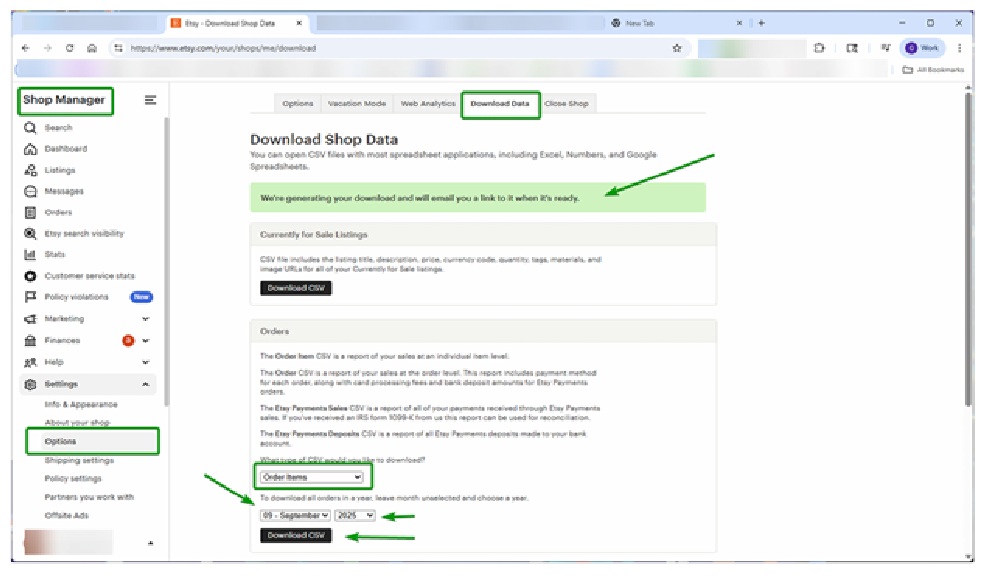
Step 2: Download Your Order Items
- Under the Orders section, find What type of CSV would you like to download and choose Order Items.
- Choose the month and year you want to export.
- Click Download CSV.
Etsy will begin building your file and email a download link to the address on your Etsy account once it is ready. Watch that inbox for the link.
Two Etsy limitations to keep in mind: only orders marked complete appear in the export, so pending and canceled orders are left out, and Etsy only lets you export by month, not by day or by individual order. Time your exports so you capture every completed order without pulling the same ones twice.
Step 3: Review Your File
- Follow the link in Etsy's email to download the file.
- Open it in Excel or another spreadsheet program.
- Remove any order lines you have already submitted to Vervante, so the file contains only new orders.
- Save the file as an XLS or XLSX.
Step 4: Send the File to Vervante
Email your reviewed spreadsheet to myorders@vervante.com.
We insert your spreadsheet into our system as you send it. We do not review the file and assume you have already checked it, and you are charged for every order created by the upload. Before you send, make sure the file contains only new, correct orders. We are not responsible for duplicate orders created by lines that were submitted before.
Etsy occasionally changes its export options and interface, so if a screen looks different, check Etsy's current help documentation. Vervante is not able to provide technical support for Etsy, but if you get stuck, reach out and we will help confirm your upload.
Looking for other setup help? See Order Processing →